Construction: Editing

This post is where i will discuss how i went about the editing of my music video and the process that went about using in order to create the music video.

At first i started to gather together all of the footage and videos that i had captured as well as the song that i will add into edit the video. the first step was finding the song and then adding hat into premier pro.


I then added all of the footage and then started to drag audio only clips in to start the creation of the music video in line with the also dragged in audio file of the song.


These clips are evidence of the split screen effect that i have used throughout my video in which the main actor features in the same shot twice this is by filming the two clips and then cropping one half of the screens way and then adding the other clip over the top of the other to create this effect of the main actor watching himself in the past.


This image shows me scaling the frame size of the shots to fit the screen size so that the footage is viewable to the best quality and size.


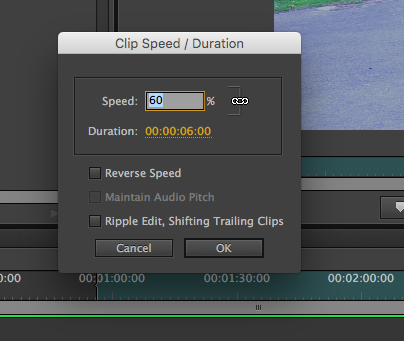


This image shows me editing the speed of some of my clips in order to either slow down or speed up clips so that it add the effect of slower motion to the clips of the pair holding on and spinning.


These images shows me editing the brightness and contrast and al of the lighting effects  of clips as well as also being able to edit the colours used and effect in order decrease the brightness of my clips as a few were too bright to fit in with the music video.


This is the effect i then used to change the lighting of the lip syncing i titled both spotlights and full directional lighting but in the end decided on the directional effect to lighten the whole image/shot.


This is then the effect i have used at the end of the video which is fading the shot to black in which the last shot of the video  will dissolve into a black screen to show the finish,


This is the Exponential fade effect that i have used at the end of the song to slowly fade the music out rather than have an abrupt ending at the end of my video.


This is then the image of me rendering the entire workspace of the video for it to then go on to be exported and uploaded 


within this test filming the practicing and trialling of the split screen effect is used and can be seen both with success and failure with some shots not working due to backgrounds or lighting.


This is showing the original footage that i just quickly put together along with the song in order to assess the footage and review what else needed to be done for filming.

Construction: practice filming


Before I started filming I wanted to practice a variety of different shots that I could use within my music video to give it a wide range of angles and a higher level of variety throughout. As you can see from the images below I have took a few shot of the filming taking place. and this therefore gives more of a viewing of where the filming took place and the cast/equipment that was used.


Construction: Raw Footage


This is the raw footage that i have captured for use on the music video that i have put together quickly with no editing just to showcase the footage that i have managed to capture and that i will edit and use to create the music video.


Construction: Practice filming


This is the test filming that i have done and thrown together as raw footage to analyse. Through doing this practice filming i have learnt and seen which shot styles will work best for me and what to avoid when doing the real filming for the music video, for example if i am using the split screen effect to be sure that the backgrounds are identical and to try my best to avoid things changing with the background as well as the lighting in the two shots not matching therefore making the shot not useable for the construction of my music video.

Planning: Filming Schedule

when creating my filming schedule i had to consider some important things such as wether or not the main actors for the music video will be available to film on certain dates that i have planned throughout the end of march which is when i intend to film for the music video, i will also film within the school theatre which i will need to book in for a time slot in which i can use these facilities.

the filming schedule also features all of the relevant information regarding the filming of the music video for example the locations in which the shots will be taken/filmed as well as which of the cast is involved in which shots and the description of what will be in the shots/what they will be based around as well as times and dates which my actors are available to film the required shots/footage for the production of my music video.

Planning: Shot List


Shot list:


This is the shot list for the music video which will be used in order to ensure that the filming is done correctly and all of the shots needed will be taken and done in the way that i have planned. therefore we will take out printed copies for use when filming at the chosen locations.


 measures to be taken:

precautions to consider: what will the weather be like? therefore what clothing should be worn to film 

Planning: audience feedback

once i had completed some of the various planning stages of my music video for example casting and costume. I chose to interview Edward Pearce a 18 year old student who i would presume would be the type of person in regards to tastes and styles that would listen and take an interest in this genre of music and chosen artist.


Overall after watching the interview back over it can be seen that the response from ed regarding the planning was very positive and he seemed to be very enthusiastic about the ideas that i have going forward with my music video. therefore i can carry on with the creation with confidence knowing that a member that enjoys this music genre agrees with my plans. planning is a very important stage in the planing both for the music video as well as the magazine and didgipack planning as it aids in seeing wether your ideas will work for the music videos or wether they will not fit the genre.